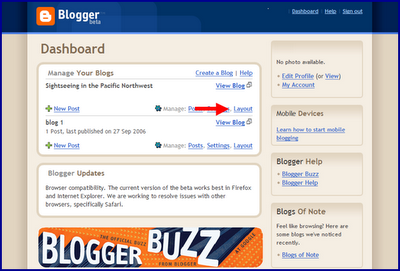
1. First, log into the new version of Blogger with your Google Account. Click on the Layout link next to the blog where you’d like to feature Google ads.
(If you don’t see the Layout option, it’s possible that your beta blog is still in the classic template -- visit your blog’s Template page and click Customize Design. You can then upgrade your blog to the new template in minutes.)
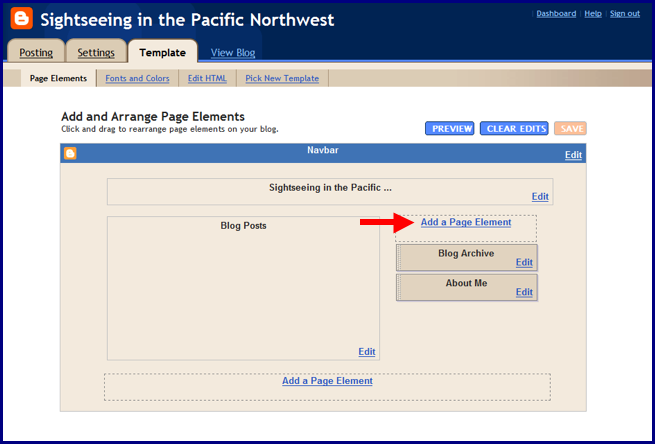
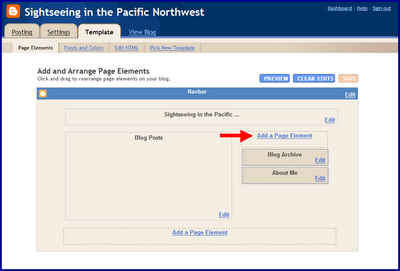
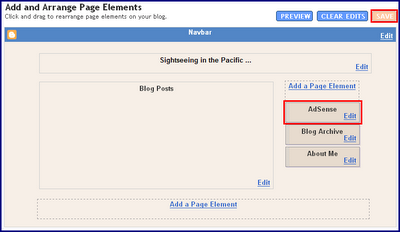
2. Next you should be taken to your Template – Page Elements page. Click on one of the Add a Page Element links shown below.
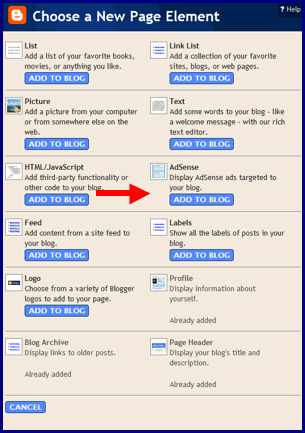
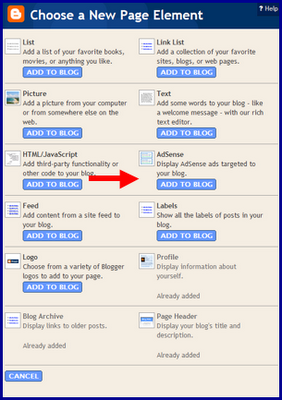
3. In the pop-up window, click the blue Add to Blog button underneath the AdSense option.
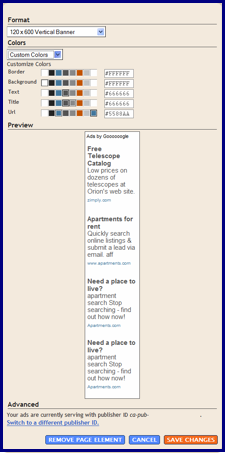
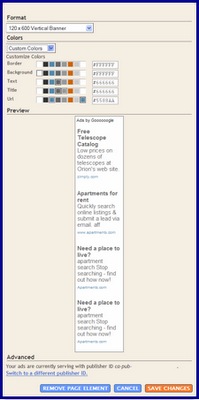
4. If you already have an AdSense account, simply sign in with your AdSense login; if not, you can create an account directly on this page. After signing in, you can select your preferred color template and ad format. When you're finished, click on the orange Save Changes button.
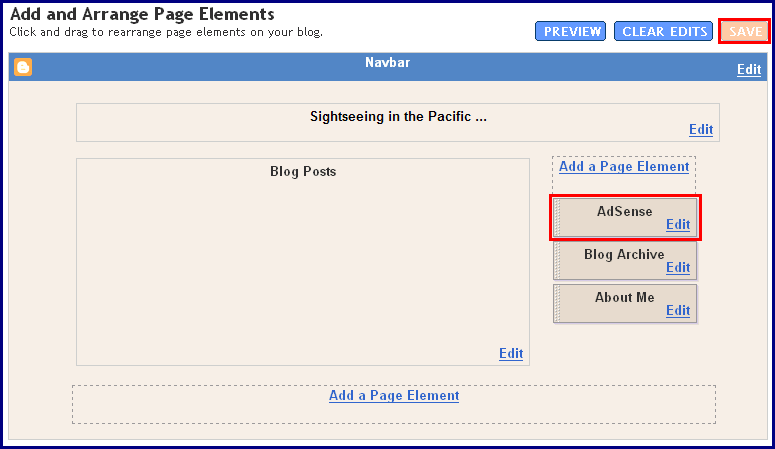
5. Now you can easily drag and drop your AdSense ad unit anywhere on your blog's template -- or delete it if you need to make changes. When you're all done, click the orange 'Save' button on the upper right corner and go view your new blog!
We hope you find this new feature helpful when implementing your ads. Let us know if you have any comments or suggestions.


16 comments:
What I am trying to figure out is where I can see the stats for Blogger AdSense units I create, since they don't get created from the AdSense site and are not associated with any channel. How do I know how my Blogger ad units are performing? (My Blogger account name differs from my AdSense account name).
I am trying find a solution for the same problem you have @Rick!
Since creating and blening ads on adsense site is quite time consuming, it can be done a lot more easier and faster if adding directly from blogger.
Some one should really reply here and post a solution .. or If there ain't any.. Blogger and Adsense both should figure out something in regards to this problem ASAP!
Thanks!
I opned a blog account almost two years ago and am back again trying to figure it out. Nothing works. I'm having the same problem as Rick. I have an Adsense account for my domain and use a different email address than the email address for Blogger. I can't get the ads to show up in my blog and I can't add a channel in Adsense - error message says the url has invalid characters. Does anyone know of an email address for real Help?
Jill
I finally got the colormatters blog to link to my Adsense account. Part of the problem was that my publisher ID was not correct and all attempts to edit it did not work.
Maybe this will help others who are trying to link their blog to an existing Adsense account. First I deleted the old Adsense page element (the one that did not link to the publisher ID of my Adsense account). Next, I added a new Adsense element. When prompted I added my account information. This time it grabbed my correct publisher ID. I think the previous error in my Adsense identity arose from the beta blogger days. However, the EDIT link (if you're trying to change the adsense ID) did not work. Good luck!
Back to Rick's question. I added a url channel to my adsense account (after I fixed the publisher ID as explained in the previous post. Although I entered the full url (beginning with http) Adsense deleted the http and accepted it. Hopefully it will track the ads.
Thanks ColorMatters... hey great blog!
Now I just have to figure out if I'm still having this problem or not!
thanks alot for this wonderful blog,with the help of this blog have been able to get my adsense running on my blog.but there is one BIG THING and that is AS THE AD STARTED RUNNING FOR REAL?COS I WAS THINKIMG IS A FLUKE,A FLUKE in the sense that it's just to cheap to appear considering the number of days have spent trying to get it right.so the question now is ,AS THE ADS STARTED RUNNING?
Great integration!
But I'd like how to use custom channels to track performance of ads on Blogspot?
Thanks for your time,
Just setting up a channel won't work to track earnings. The channels have to be linked to from ad units. The blogger doesn't add ad units to the account. Does anyone know how to get the blogger ad units to show on the adsense account. My blogger adsense units ?show the correct adsense account.
do anyone know how to apply for adsense account for blogger... i think they don't accept for blogger..i tried but adsense application itself not accepting my form with message website cannot be on google server.. then how other people add adsense to their blogger posts
Hi Zasbo. As long as you have signed up for Adsense from the Google website, you are given a publisher ID. That is the id you need to use when setting up the Adsense widget in your blog.
Unfortunately, I don't really see any major solutions here, I don't know if I made any clicks from my Blogger Adsense at all, and last week they disabled my account and I'm not 100% certain why. Much to look into, yet there are other ways to make money online other than Adsense.
Make money with good intentions.
-Rick
Hi, when Adsense asked me to verify my ads for Blogger I accidentally clicked no -- and now I can't edit my ads and get this error message a lot: "bX-7mmmsq"
Is there a way to correct this? I've searched everywhere and a lot of people have this question and haven't been able to get an answer besides "clearing my cache".
I am a new AdSence customer. I have not been able to authenticate by web page. Since I have office live, I changed the HTML to XSLT (office live says it's the only way it will work). In advanced settings, when I paste the converted text into the custom header module, it says the format, or something , is wrong. I have removed existing XSLT and then pasted on the conversion. It still doesn't work. I am going nuts! Can anyone help me? I wonder if I'm wrong with the page that wants restricted URL and URL? I'm not sure these are right. Well, I know the info from office live page is correct. Any tricks to get me going? Thanks, Suzette
i have few blogs and im runing ads on them.wen i put ads using blogger that easy way without cods.ads are targated to my content on my blog.how this happen without sutable channels in my adsense account.
I have done the part but I can't see any ad on my blog (http://supermoney2009.blogspost.com). I don't know what to do
I revently made a blog page and set up the adsense ad blocks, they work great, but so far all the ads are just promos , not worth anything. How do I ensure the ads are woth at least a penny a click.
Ian
Post a Comment