
Search no further than your own site
Wednesday, August 16, 2006
If you haven't tried our AdSense for Search feature yet, now might just be the perfect time to put it to use -- we're pleased to announce that you can now display AdSense for search results within your own site. This way, you have the freedom to offer users web search while still maintaining the look and feel of your site. For example, you can keep elements like the header, footer, and site navigation panel the same for the search results page you create.
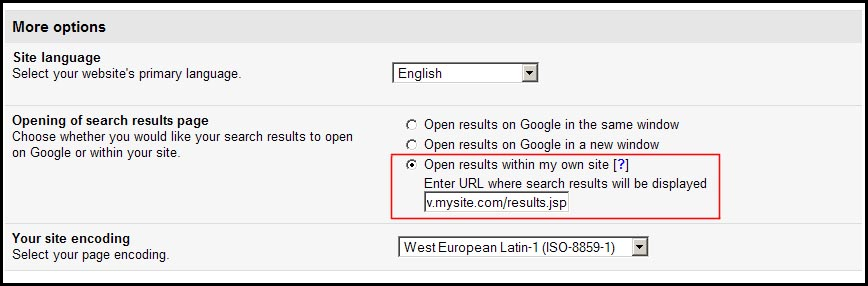
To use it, just choose the "Open results within my own site" radio button when you're generating your AdSense for search code. You'll also need to identify the page where you'd like to display your search results.

We'll give you two sets of code: one for the search box, and one for search results. Place the first set on a page where you'd like the search box to appear, and the second set on the page you'd like the search results to appear. Whenever users perform searches on your AdSense for search box, they'll be directed to the page on which you placed the search results code.
Since this new feature is part of AdSense for search, any Competitive Ad Filter and site-flavored search settings will still function as normal. You can also find detailed instructions for implementing this new option in our Help Center. Keep in mind that if you want your existing search boxes to take advantage of the new feature, you'll need to replace the search box code that's currently on your pages.
To use it, just choose the "Open results within my own site" radio button when you're generating your AdSense for search code. You'll also need to identify the page where you'd like to display your search results.
We'll give you two sets of code: one for the search box, and one for search results. Place the first set on a page where you'd like the search box to appear, and the second set on the page you'd like the search results to appear. Whenever users perform searches on your AdSense for search box, they'll be directed to the page on which you placed the search results code.
Since this new feature is part of AdSense for search, any Competitive Ad Filter and site-flavored search settings will still function as normal. You can also find detailed instructions for implementing this new option in our Help Center. Keep in mind that if you want your existing search boxes to take advantage of the new feature, you'll need to replace the search box code that's currently on your pages.


